
When it comes to accounting software for small and growing businesses, QuickBooks consistently stands out as one of the most trusted names in the market. Developed by Intuit, QuickBooks has evolved over the years into a powerful, flexible platform that supports freelancers, startups, small businesses, and even expanding mid-sized companies.
If you are searching for the best QuickBooks pricing, the answer depends on your business size, your workflow, and the features you truly need. Instead of simply looking for the cheapest plan, it’s smarter to focus on value—what you get for what you pay.
Below is a detailed breakdown of QuickBooks pricing options, what each plan offers, and how to determine which version delivers the best value for your money.
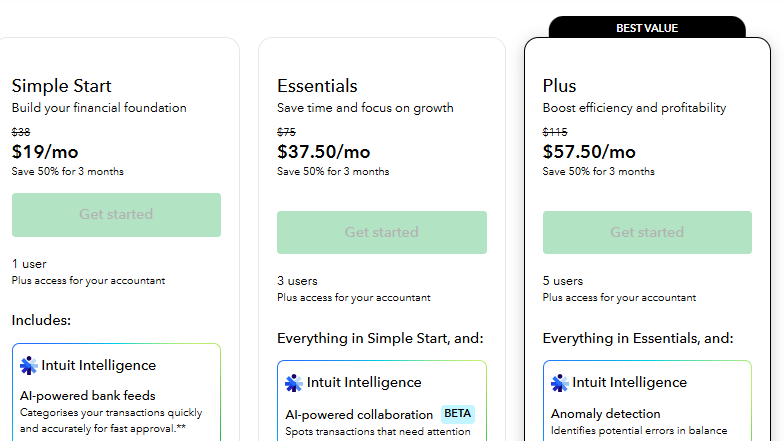
QuickBooks Online Pricing Plans
Most businesses today choose QuickBooks Online because it is cloud-based, meaning you can access your books anytime, anywhere. QuickBooks Online typically offers several subscription tiers:
1. Simple Start
This is the entry-level plan and is ideal for freelancers, solopreneurs, and single-owner businesses.
Best for: One-person businesses that only need basic accounting.
Key Features:
- Income and expense tracking
- Invoice creation and customization
- Receipt capture
- Basic reporting
- Sales tax tracking
Simple Start is the most affordable QuickBooks plan. If your business is small and straightforward, this plan often provides the best pricing in terms of cost versus functionality. You don’t pay for tools you won’t use.
2. Essentials
This plan is a step up and is designed for small teams.
Best for: Businesses that need to manage bills and allow multiple users.
Key Features:
- Everything in Simple Start
- Bill management
- Time tracking
- Multiple users (typically up to three)
Essentials offers better value if you are starting to collaborate with a bookkeeper or small team. The price increase from Simple Start is reasonable considering the added functionality.
3. Plus
This is one of the most popular QuickBooks Online plans.
Best for: Growing businesses that manage inventory and projects.
Key Features:
- Everything in Essentials
- Inventory tracking
- Project profitability tracking
- Budgeting tools
- Expanded reporting
- More users (typically up to five)
For many small businesses, Plus offers the best balance between pricing and features. If you sell physical products or want deeper financial insights, this tier often delivers the strongest overall value.
4. Advanced
Advanced is designed for larger or more complex businesses.
Best for: Businesses needing advanced reporting, automation, and higher user limits.
Key Features:
- Advanced analytics and reporting
- Custom user permissions
- Workflow automation
- Higher user limits
- Dedicated support options
While Advanced has the highest subscription cost, it may offer the best pricing in terms of return on investment for businesses that rely heavily on automation and detailed reporting.
QuickBooks Desktop Pricing
Although many users prefer the cloud, some still choose QuickBooks Desktop for its traditional, locally installed setup.
Desktop versions usually come in editions such as:
- Pro
- Premier
- Enterprise
Desktop pricing is typically structured as an annual subscription. Enterprise is the most expensive but offers powerful features for inventory-heavy or industry-specific businesses.
For companies that do not need remote access and prefer a one-location accounting system, Desktop can sometimes feel more cost-effective.

What Makes QuickBooks Pricing Worth It?
Choosing the best QuickBooks pricing is not only about monthly cost. It’s about value, efficiency, and time savings.
1. Time Saved
Automated bank feeds, recurring invoices, and built-in reports reduce manual work. The hours saved every month often justify the subscription cost.
2. Scalability
You can upgrade as your business grows. This flexibility ensures you only pay for what you need at each stage.
3. Integration Options
QuickBooks integrates with hundreds of third-party tools including payment processors, payroll services, and eCommerce platforms. This connectivity adds significant value.
4. Reliable Brand Reputation
As a product of Intuit, QuickBooks benefits from decades of trust in the accounting industry. That reliability matters when managing financial data.
Which Plan Offers the Best QuickBooks Pricing?
The “best” pricing depends on your situation:
- Freelancers and consultants: Simple Start offers the best value.
- Small service-based teams: Essentials is often the sweet spot.
- Product-based businesses: Plus provides strong inventory tools at a reasonable cost.
- Established companies with complex needs: Advanced may justify its premium pricing.
For many growing small businesses, the Plus plan typically delivers the best balance between affordability and functionality.
Hidden Costs to Consider
When evaluating QuickBooks pricing, remember to factor in:
- Payroll add-ons
- Payment processing fees
- Third-party app subscriptions
- Accountant access (if applicable)
These extras can increase the total cost, but they also expand functionality.
How to Get the Best Deal
Here are a few ways to secure better QuickBooks pricing:
- Look for promotional discounts (often available for new subscribers).
- Consider annual billing if it offers savings.
- Choose the lowest plan that truly fits your needs.
- Avoid overpaying for unused features.
Many businesses start small and upgrade later once their needs become clearer.
Final Thoughts
QuickBooks pricing is structured to serve businesses at every stage—from solo entrepreneurs to established companies managing complex operations. While the lowest-priced plan may seem attractive at first glance, the best QuickBooks pricing ultimately depends on how much value you gain from the features provided.
For most small and growing businesses, QuickBooks Online Plus often stands out as the best overall value. However, freelancers may find Simple Start more than sufficient, while larger teams may benefit from Advanced.
Instead of focusing only on cost, consider the long-term return: time saved, reduced errors, improved financial visibility, and better decision-making. When used effectively, QuickBooks becomes more than just accounting software—it becomes a central tool that supports smarter business growth.