
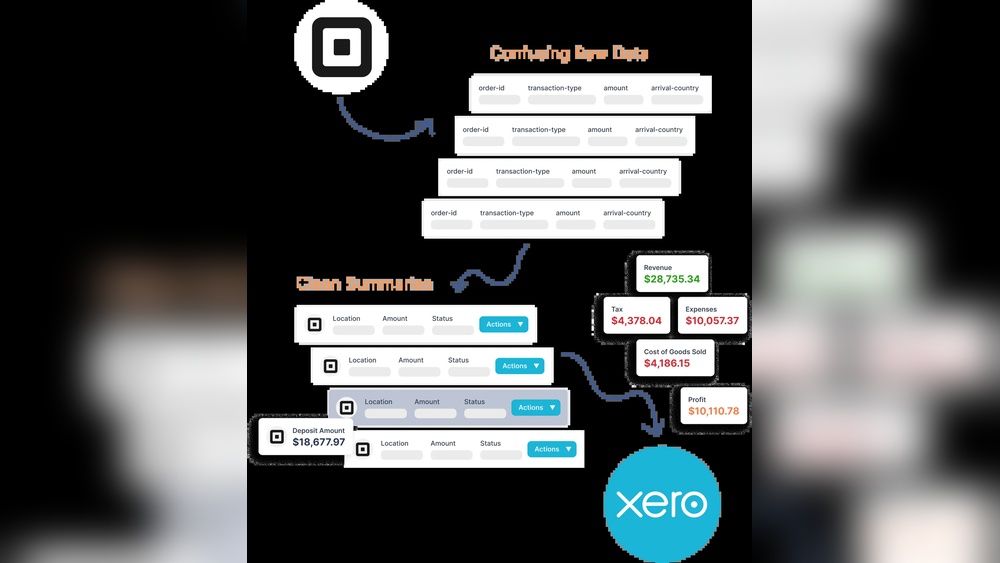
If you use Square to take payments, you might want to keep your accounts clean. Xero is a popular tool for accounting. But can Square work together with Xero? The answer is yes. They can connect using a special app. This makes bookkeeping easier for many business owners.
What is Square?
Square is a tool that helps businesses accept payments. It can work with credit cards, cash, and more. Many small shops and cafes use Square. It helps them keep track of sales and money.
What is Xero?
Xero is a software for accounting. It helps businesses manage money, bills, and taxes. Many businesses use Xero to keep their financial work organized. It is easy to use and works online.
How Do Square and Xero Work Together?
Square and Xero do not connect by themselves. But there is an app called Amaka. This app helps link Square to Xero. When you use Amaka, your sales data from Square goes straight to Xero. This saves time and cuts errors.
What Data Moves From Square To Xero?
- Sales made each day
- Refunds given to customers
- Fees charged by Square
- Taxes applied on sales
What Happens Inside Xero?
- A daily sales invoice is created
- Bills for fees from Square are recorded
- Payments are matched to the right accounts
- Bank deposits are reconciled with sales
In short, the app makes sure all sales and fees are recorded correctly in Xero.
Benefits of Using Square with Xero
Many business owners like this integration because it helps them manage money better. Here are some key benefits:
| Benefit | Explanation |
|---|---|
| Automation | Stops manual data entry. Saves time and reduces mistakes. |
| Accurate Reporting | Shows true income and expenses clearly. |
| Simplified Reconciliation | Makes matching bank deposits to sales easier. |
| Supports Tips and Surcharges | Records extra charges like tips and gift cards properly. |
How to Set Up Square and Xero Integration
Setting up the connection is simple. Follow these steps:
- Log into Square: Go to your Square account online.
- Find Amaka: Visit the Square App Marketplace. Search for the Amaka app.
- Connect to Xero: Authorize Amaka to access your Xero account. You will need to log into Xero.
- Map Accounts: Follow the setup guide to link your Square sales to Xero accounts.
- Complete Setup: Finish the setup and check the first synced data.
This process will link your Square and Xero accounts. After this, your sales data will transfer daily.
Credit: squareup.com
