
If you run an online store, you might use Shopify to sell products. You also need to keep track of money and accounts. Xero is a popular tool for this. The big question is: does Shopify integrate with Xero? This article will explain how these two work together and why it matters for your business.
What Are Shopify and Xero?
Shopify is a website platform that helps you create an online store. It manages products, sales, and customers. Many small and big businesses use Shopify to sell online.
Xero is accounting software. It helps business owners keep track of money coming in and going out. Xero can create reports, track expenses, and manage invoices.
Using both tools together can make running a business easier.
Why Connect Shopify to Xero?
When you use Shopify and Xero separately, you must enter data twice. For example, sales from Shopify need to be added into Xero by hand. This takes time and can cause mistakes.
Connecting Shopify to Xero means your sales data moves automatically. This saves time and reduces errors. You get a clear picture of your cash flow every day.
Benefits Of Integration
- Automatic Data Transfer: Sales, taxes, and fees move without manual work.
- Accurate Accounting: Less chance of errors in numbers.
- Time Saving: Focus on your business, not data entry.
- Better Cash Flow Tracking: See your money status clearly and quickly.

How Does Shopify Integrate With Xero?
Shopify does not connect to Xero by itself. You need a third-party app or tool. These apps link the two platforms to share data smoothly.
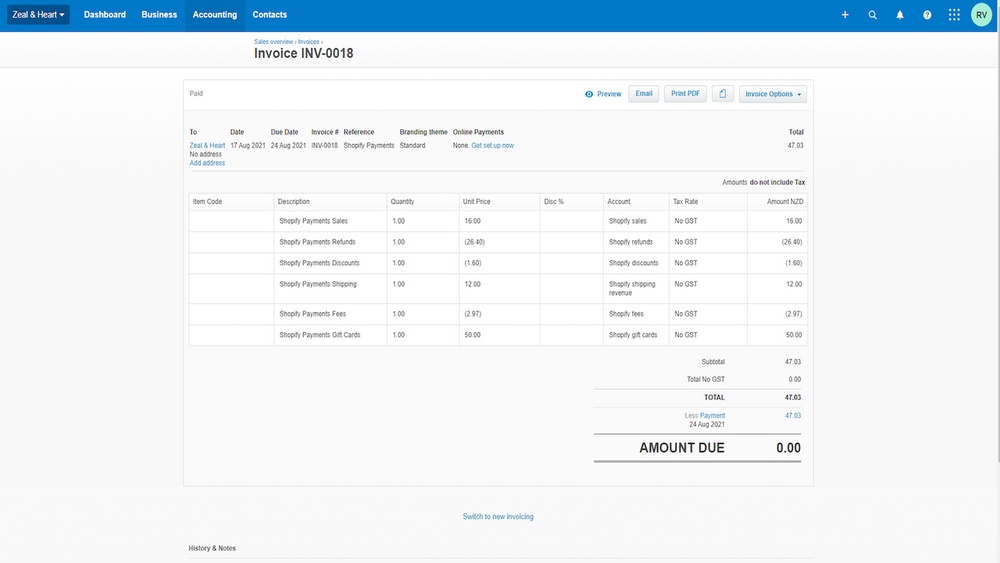
One common app for this is called Shopify Integration by Xero. It sends a daily summary of your Shopify sales to Xero. This summary includes:
- Total sales
- Taxes collected
- Fees paid
This happens automatically every day, giving you an updated view of your business money.
Popular Integration Tools
| Tool Name | Key Feature | Cost |
|---|---|---|
| Shopify Integration by Xero | Daily sales sync, easy setup | Free or subscription-based |
| Zapier | Connects many apps, customizable | Free and paid plans |
| Amaka | Automates bank reconciliation | Subscription-based |
Step-by-Step: How to Connect Shopify with Xero
Follow these steps to start syncing your Shopify sales with Xero.
- Go to the Xero App Store and find the Shopify Integration app.
- Click Get App or Connect to start the setup.
- Log in to your Shopify account when asked.
- Allow permissions for the app to access your Shopify sales data.
- Choose how you want sales data to appear in Xero.
- Save and finish the setup.
Once done, your Shopify sales will send to Xero automatically at day-end.

What Data Syncs Between Shopify and Xero?
Here is what usually moves from Shopify to Xero:
- Daily sales totals
- Sales taxes collected
- Payment fees (like credit card charges)
- Refunds and returns
This data helps you keep your accounting accurate and complete.
How to Use Xero After Integration
Once your sales data is in Xero, you can:
- Check your daily cash flow
- Reconcile bank accounts easily
- Generate financial reports
- Prepare tax returns
You save hours on bookkeeping and have better control over your business money.
Common Challenges and Solutions
While integration helps, some issues may arise.
1. Data Not Syncing Correctly
Sometimes, sales might not appear in Xero immediately. Check these:
- Is the integration app active and connected?
- Are Shopify and Xero accounts correct?
- Is there a system update or error?
Restarting the app or reconnecting can fix this.
2. Complex Tax Settings
Shopify and Xero have different tax rules. Make sure tax settings match in both places. This keeps reports accurate.
3. Handling Multiple Currencies
If you sell in many currencies, check if your integration supports this. Some apps may need extra setup for currency conversion.
Tips for Smooth Shopify and Xero Integration
- Choose a well-reviewed integration app.
- Regularly check sync status and reports.
- Keep your Shopify and Xero accounts updated.
- Use Xero’s help guides for accounting questions.
- Back up your data before big changes.
Conclusion
Does Shopify integrate with Xero? Yes, but with help from apps.
This connection saves time by moving sales data automatically. It helps keep your accounts clear and up-to-date. You avoid mistakes and focus on growing your store.
If you want to keep better track of your money, linking Shopify and Xero is a smart choice. Try it today and see how simple managing your business can be.